✅ YouTubers & Creators
✅ SEO Experts
✅ Mobile Farm & Modders

1 APP FOR ALL YOUR
DIGITAL NEEDS!

Leave manual workflows behind. Flowork OS integrates content research, multi-account management, interaction automation, Mobile Farm, and APK Reverse Engineering into one elegant smart workspace.

"My desk used to be full of gadgets and dozens of browser tabs that slowed down my PC. Since switching to Flowork OS, from SEO optimization, controlling dozens of physical phones (Mobile Farm), to APK modding, everything runs automatically in one place. Best investment ever!"
— Digital Marketing & Modder Expert
Flowork OS: Founder's Edition – The Ultimate God-Mode Automation Workspace

Join hundreds of other experts today. Extremely Limited Access!

Still Stuck in Operational Routines?

Working hard is great, but working smart is the key to scaling up. Check if you're still experiencing these issues:

❌ Creator Burnout

For YouTubers, maintaining upload consistency is exhausting. Let alone replying to comments and managing account interactions to keep it alive.

❌ Clunky Device Management

Tired of plugging and unplugging cables for APK testing, dealing with slow screen mirroring, or the hassle of screen recording & live streaming from multiple physical phones at once.

❌ Frustrating APK Modding

Going back and forth opening CMD for Apktool, decompiling, rebuilding, to forgetting to sign the APK. Time wasted just on technicalities and facing Java errors.

❌ Complex SEO Audits & Research

For SEO practitioners, extracting data from various sites or analyzing competitor backlinks manually is very time-consuming and inefficient.

❌ Vulnerable Multi-Account Management

Managing many account assets (brands or channels) on one PC risks platform restrictions for being detected by anti-spam algorithms.

Why Do You Need Flowork OS?

This app is not a generic tool. We designed it specifically to solve the daily pain points in your profession.

🎬 For YouTubers & Content Creators

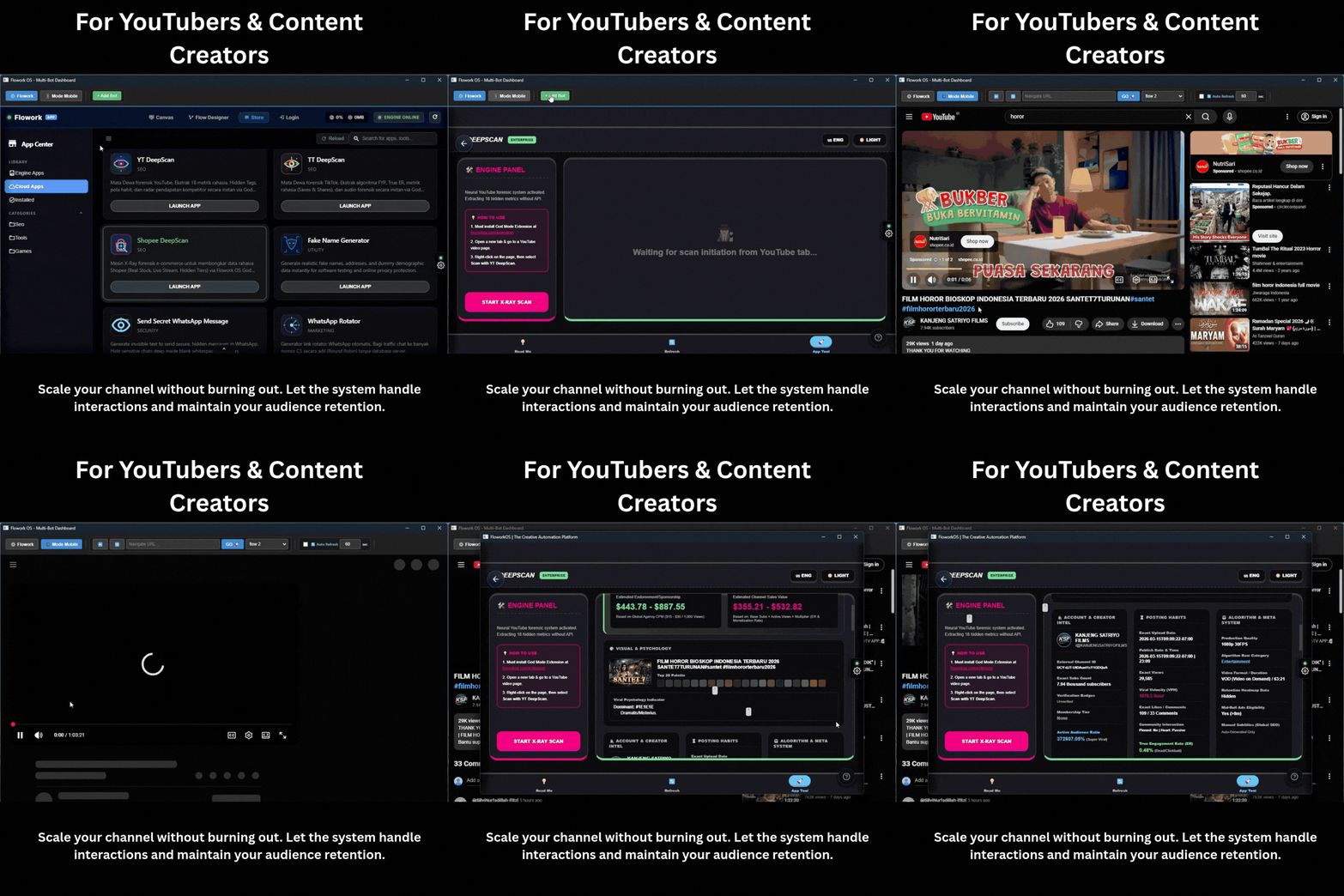
Scale your channel without burning out. Let the system handle interactions and maintain your audience retention.

  • Master-Follower Sync: Have many support accounts? Just move 1 main account, other accounts automatically scroll, like, and comment naturally!
  • Watch Time Automation: The "Biological Clock" feature ensures your bot works like a human who needs rest, guaranteed safe from YouTube shadowbans.
  • Clip Protocol Editor: Built-in lightweight video editor inside the browser for super fast video trimming without opening heavy apps.
Demo Flowork OS for Youtubers

📱 Mobile Farm, Modding & Multi-Account Management

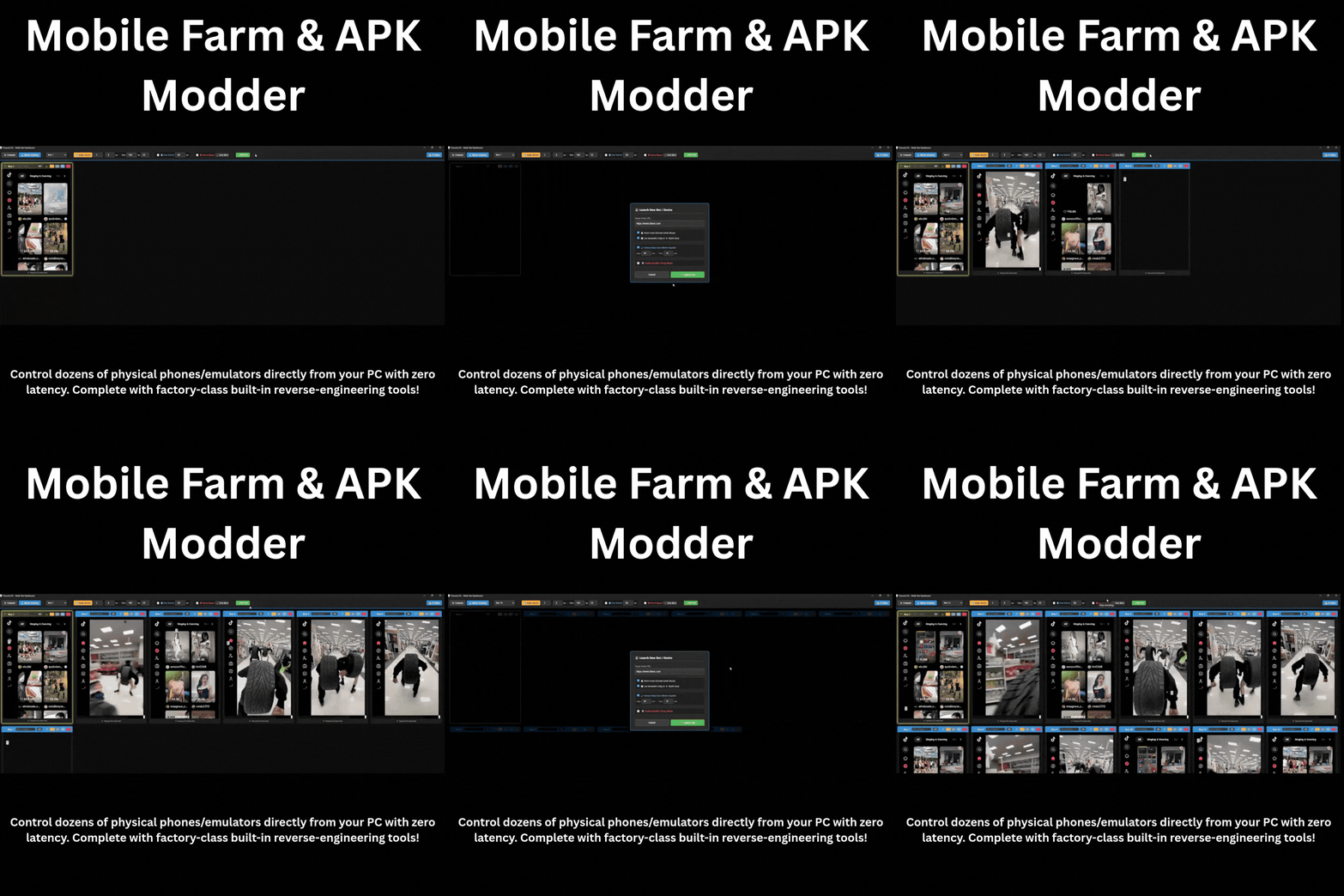
Control dozens of physical phones/emulators directly from your PC and run hundreds of account assets simultaneously without fear of mass blocking!

  • Perfect Isolation & Sandbox: Open dozens of bot tabs at once. Each runs in a separate environment with independent device fingerprints and Proxy IPs.
  • Scrcpy & ADB Engine: Super smooth 60fps screen mirroring, Live Stream capabilities, and 1-click Native Paste.
  • System Inspector & Modding: Pull target APKs, monitor Live Logcat, Decompile (JADX), and use visually integrated Disassemble & Rebuild (Apktool) with Auto-Signer.
  • Seamless Navigation & Performance: Switch accounts without login-logout. Enjoy super lightweight memory allocation that won't slow down your PC.
Demo Mobile Farm & Multi Account

📈 For SEO Experts & Digital Marketers

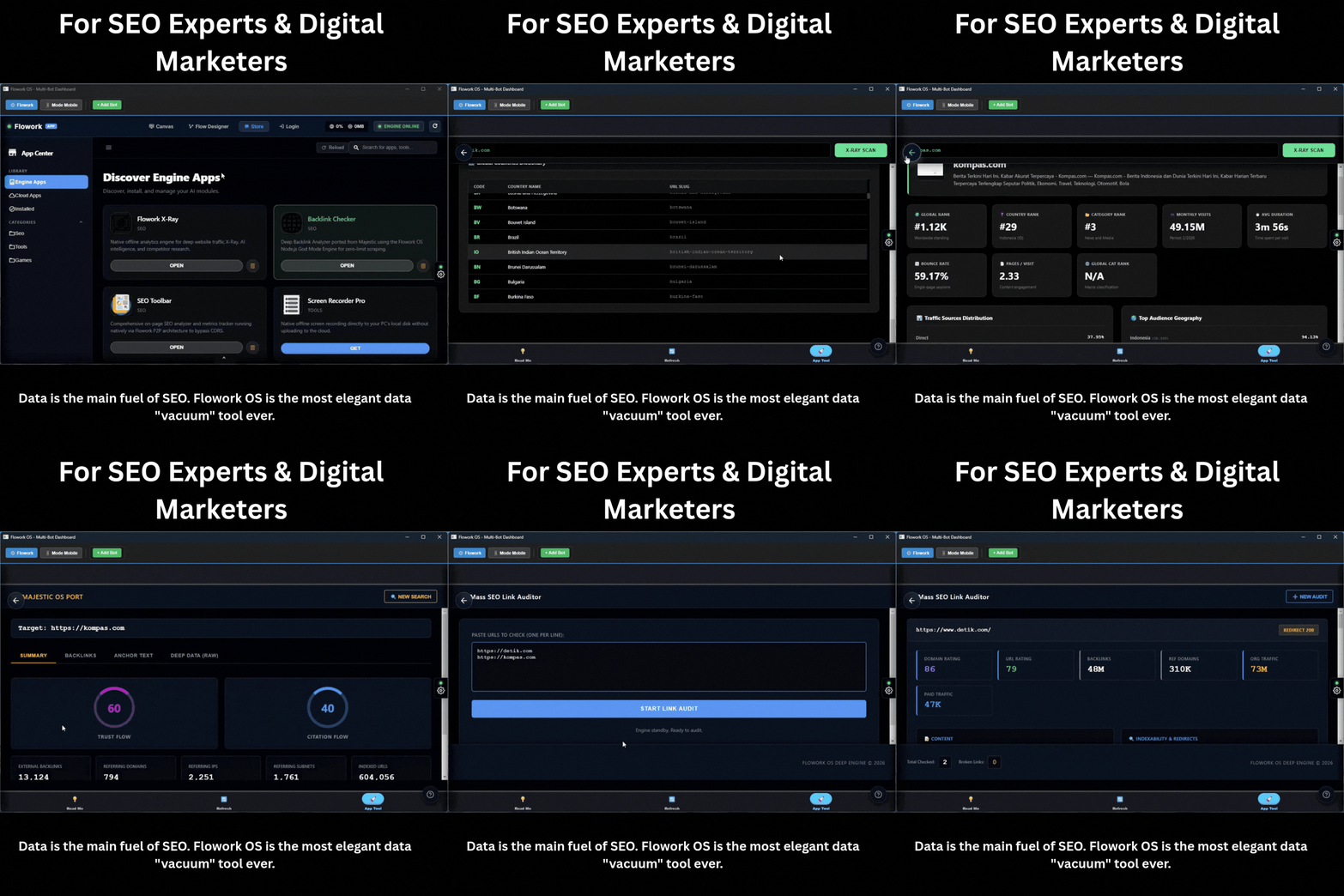
Data is the main fuel of SEO. Flowork OS is the most elegant data "vacuum" tool ever.

  • 🔥 GOD MODE (Data Extractor): Extract all structured data (JSON) and hidden tags from competitor websites with just one click.
  • Productivity App Store: Access Keyword Mixer tools, Backlink Analysis, and Persona Generators to build your PBN (Private Blog Network) with strong identities.
  • Google Sheets Integration: Automate your SEO research results directly recap neatly into Google Sheets without manual copy-pasting using Flow Designer.
Demo Flowork OS for SEO Experts

⚙️ Visual Drag & Drop Automation (No-Code)

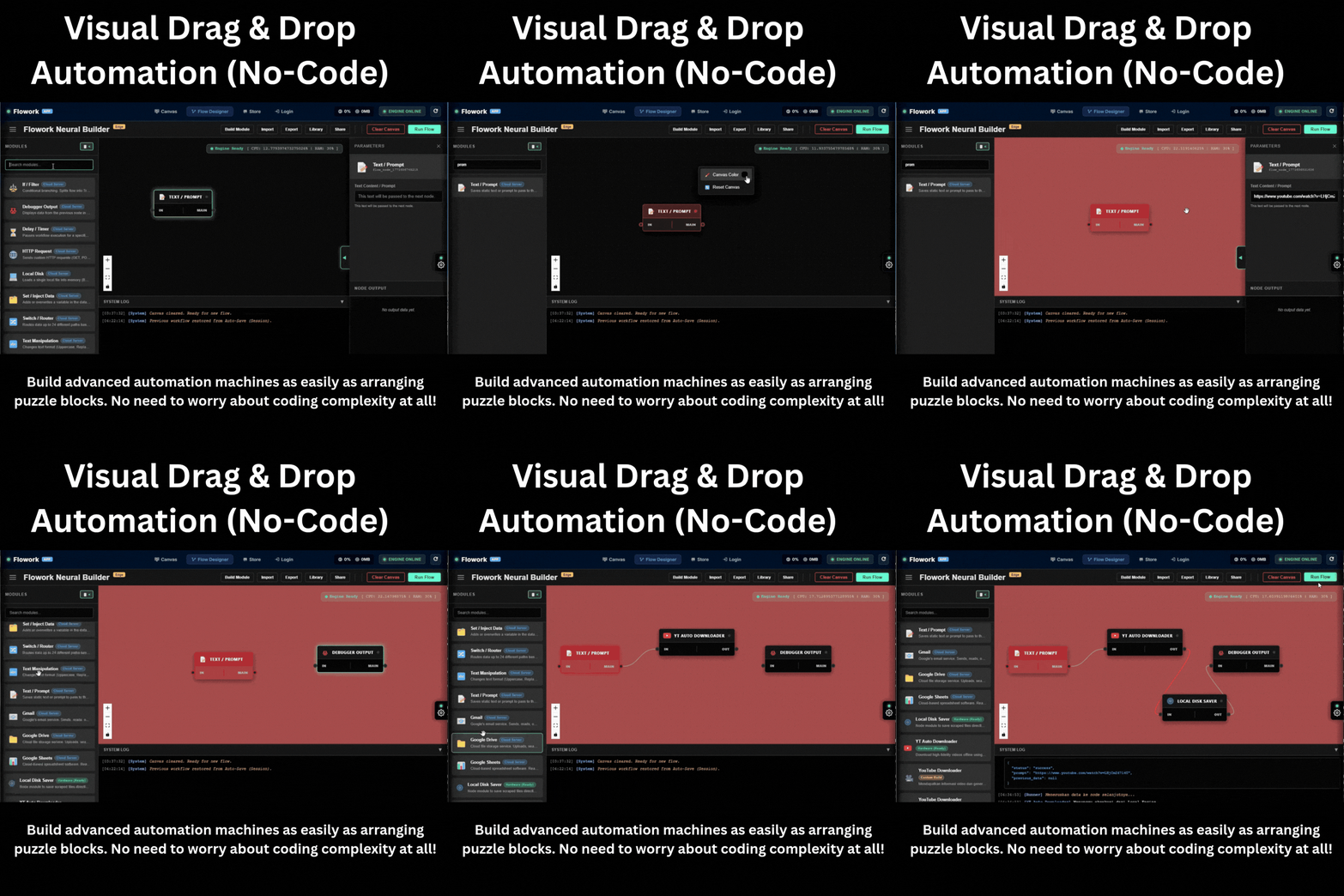
Build advanced automation machines as easily as arranging puzzle blocks. No need to worry about coding complexity at all!

  • Node-Based Workflow: Design visual workflows. Just drag and connect dots (nodes) between triggers, logic instructions, and actions.
  • Limitless Automation: Set the bot to click web elements, fill forms, extract data, to sending automatic reports to Google Sheets.
  • Precision Execution & Monitoring: Monitor data flow from one step to another in real-time. If a flow isnt quite right, just slide and fix it directly on the canvas.
Demo Drag and Drop Workflow Flowork OS

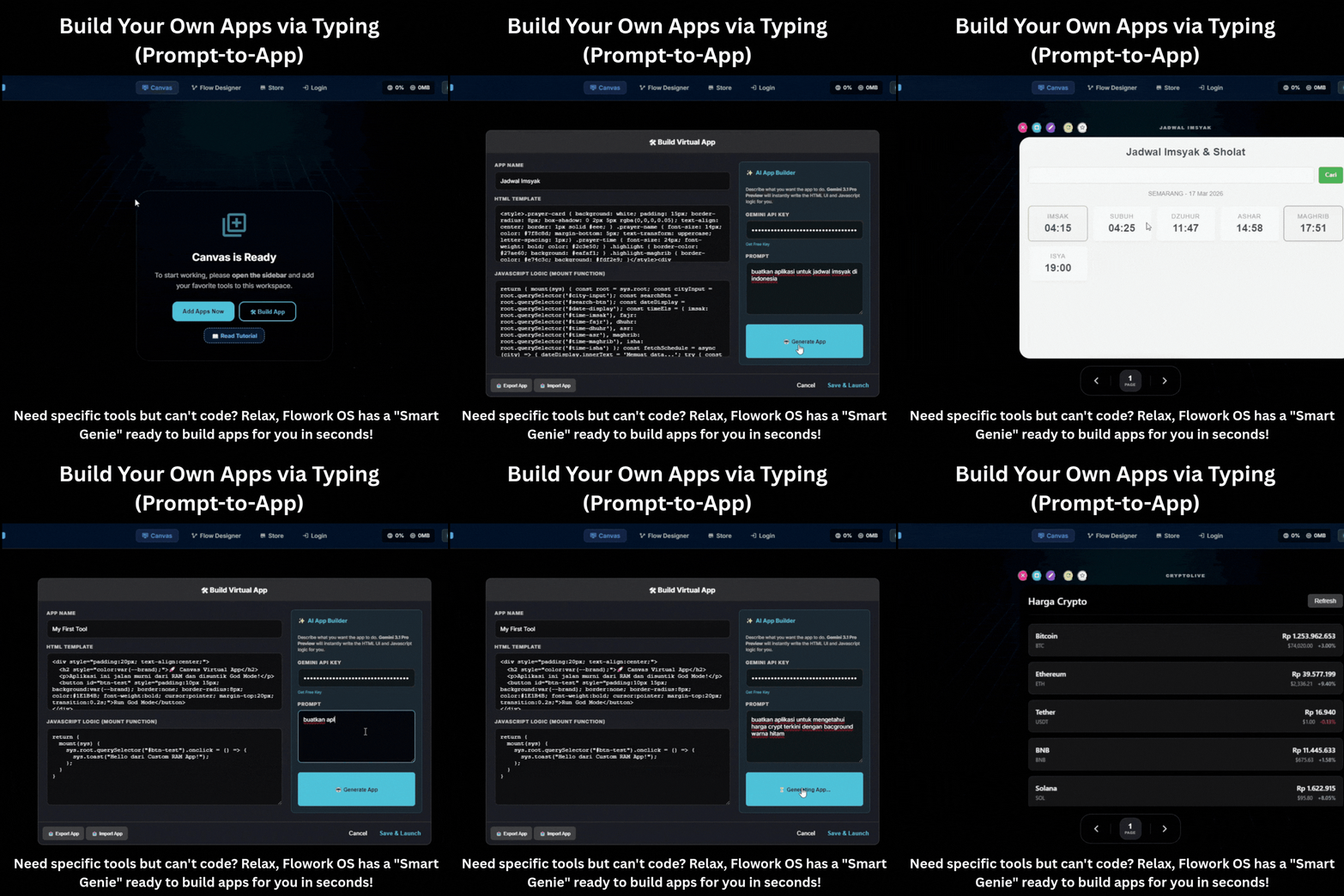
🪄 Build Your Own Apps via Typing (Prompt-to-App)

Need specific tools but can't code? Relax, Flowork OS has a "Smart Genie" ready to build apps for you in seconds!

  • Just Enter Prompt: Type the description of the app you want (e.g., "Make me an affiliate commission sharing calculator").
  • AI Auto-Generate: Our internal engine will assemble the UI (interface) and its function logic automatically without programmer intervention.
  • Instantly Ready to Use: The mini-app you requested immediately appears on the screen and is permanently saved in your workspace. Magic!
Demo Prompt to App Flowork OS

15 Pillars of Flowork OS Arsenal

The powerhouse behind your smooth content operations and digital campaigns. Everything is on one screen.

1. 🖥️ Super Flexible Workspace

Customize your workspace layout:

  • Flowork Mode: Clean central dashboard.
  • Mobile Mode: Special view to focus on managing one vertical account.
  • Desktop Mode: Grid view (multiplex) to monitor dozens of account assets (drag & drop) simultaneously.

2. 🕵️‍♂️ Digital Identity Protection (Anti-Detect)

Advanced security for managing multiple accounts:

  • Hardware Masking: Disguises PC specifications (CPU/RAM/VGA).
  • Canvas Protection: Protects screen digital fingerprints.
  • User-Agent Switcher: Adjusts device (Android/Windows).
  • Proxy Integration: Ensures 1 profile has 1 exclusive natural IP.

3. 🤖 Natural Interaction Automation

Smart interaction system like real audiences:

  • Master-Follower Sync: 1 click on the main tab, other tabs automatically synchronize activities.
  • Organic Schedule: Set rotation of active and rest hours naturally.
  • Smart Auto Scroll: Automatic page navigation (random interval) to maintain account health.
  • Smart Bypass: Record and bypass annoying popups or ads permanently.

4. 🍪 Instant Profile & Session Management

Log in and out of accounts seamlessly:

  • Session Vault (Cookie Vault): Export/Import login statuses without needing to enter passwords repeatedly.
  • Profile Manager: Group hundreds of account assets and load those profiles with one quick click.

5. 🎯 Smart Omnibox

A smart navigation bar that understands your intent. Automatically adjusts URL formats or redirects keywords straight to Google search engine without extra steps.

6. 🧩 DeepScan Analytics (Per Platform)

Right-click on any page to call specific features:

  • Data Extractor: Fetch and map structured data from public webs for SEO research.

7. ⚙️ Flow Designer (Visual Automation)

No-Code automation canvas:

  • Design workflows with Drag-and-Drop.
  • Integrate logic, delays, and form filling.
  • Google Ecosystem: Connect your workflow directly with Gmail and Google Sheets.

8. 🌐 Workflow Library (Automation Marketplace)

A collaborative library. You can save your flagship automation scripts, share them with team members, or download workflow templates from other practitioners in the community.

9. 🎨 Infinite Canvas (Mindmapping)

Infinite visual workspace. The most fun place for you to design campaign mindmaps, sketch marketing strategies, or connect SEO flows before applying automation.

10. 🔐 High-Standard Data Encryption

Keeping your kitchen secrets safe. This app is equipped with a Nexus Editor module with End-to-End Encryption system to ensure all your notes, AI prompts, and strategies remain private and secure.

11. 💻 True Web OS Experience

The comfortable feel of a premium operating system inside the browser. You will get a multifunctional Dock (Taskbar) and floating micro-apps windows that can be moved and resized (sandboxed environment).

12. 📡 Real-Time P2P Connection

High-level communication stability. Peer-to-Peer (P2P) and WebSocket technology allow data exchange between users or app interfaces to run instantly without burdening central servers.

13. 🧠 Neural Ingestor (Specific AI Assistant)

Smart infrastructure capable of processing massive research data from web pages, then structuring it so the AI (Language Model) you use can understand your campaign context in detail.

14. 📱 Mobile Farm (ADB & Scrcpy Engine)

Control dozens of physical phones/emulators via USB/WiFi. Enjoy 60fps mirroring, Unified Human Bot (Organic Swipe) feature, and Native Paste (Sync PC clipboard to phone with 1 button).

15. 🛠️ APK Inspector & Modding Tools

Dissect Android apps straight from PC. Pull APK features, Live Logcat, Decompile (JADX) with Gradle injection, to Disassemble & Rebuild (Apktool) equipped with Auto-Signer.

What Our Beta Testers Say

Don't just take our word for it. See how Flowork OS is transforming digital workflows.

FAST ACTION BONUS

🎁 Exclusive Flowork Chrome Extension

Use our powerful toolkit anywhere! A standalone Chrome Extension compatible with Mac, Windows, and Linux.

  • Over 15+ Advanced Tools built directly into your browser.
  • Developer Utilities: Inspect, debug, and trace with ease.
  • High-Level Security: Vulnerability checks and network analysis.
  • SEO & Data Analysis: On-the-go metrics scraper and keyword extractor.
Value: $97 YOURS TODAY: 100% FREE!

It's Time to Scale Up Your Revenue!

No need to worry about expensive tools. Get the ultimate engine now and supercharge your digital workflow!

FOUNDER'S EDITION

FLOWORK OS PREMIUM LICENSE

$199
$47 / Lifetime

(Get full access to all features: Mobile Farm, APK Modding, Multi-Account Anti-Detect, and SEO God Mode.)

⚠️ WARNING: Strictly Limited Founder's Edition.
Once we hit 500 users, the price will revert to $97/Month!

*Secure processing via JVZoo.

Flowork OS: Founder's Edition – The Ultimate God-Mode Automation Workspace

Instant Delivery. 100% Secure Checkout.

🛡️
100% Risk-Free 14-Day Guarantee If you experience technical failures, get your money back.

Frequently Asked Questions (FAQ)

Find answers to the most frequently asked questions by creators and marketers here.

1. What differentiates Flowork OS from conventional browsers?
Flowork OS is not just a browsing tool. It is a comprehensive workspace that integrates account isolation, content research tools, SEO scrapers, Mobile Farm, APK dissection tools, and visual automation (No-Code) in one interface like a PC operating system.
2. I'm a YouTuber who is often overwhelmed. Are there features for me?
Absolutely! The Master-Follower Sync feature and interaction automation allow you to manage audience engagement from various support accounts without having to type manually one by one.
3. As an SEO practitioner, is this the right tool?
Of course. Specific tools are available such as JSON data extractors for crawling, Keyword Mixer tools, and direct integration to Google Sheets to recap backlink audit results or PBNs automatically.
4. Is "Organic" automation really safe from platform restrictions?
Very safe. Our system mimics human pauses (Human Sleep Cycle) and random scroll rotation interactions (Smart Auto Scroll), so the platform machine reads your activity like a real audience, not third-party software.
5. The Mobile Farm and Apktool features, who are they for?
For APK Modders and Mobile Testers, this feature is heaven. Controlling many phones (Scrcpy), pulling APKs from the system, dissecting the code to Java/Smali (Decompile/Disassemble), modifying, then rebuilding with Auto-Signer. All centralized from one screen.
6. Do I need coding skills to create automation?
Not at all. The Flow Designer feature is designed 100% visually. You simply drag & drop instruction elements, and the app will execute them.
7. Do my computer specifications have to be very high (god specs)?
Flowork OS is quite efficient. Minimum specifications with 4GB RAM on your PC can already run it (best recommendation 8GB). There is a "Bandwidth Saver Mode" feature that forces very low video resolution to ease CPU & RAM performance.
8. Is Flowork OS compatible with Mac (Apple) or Linux?
No. The Core Software is strictly exclusive for Windows PC. We engineered it specifically for Windows to guarantee maximum stability and performance for heavy-duty tasks like Mobile Farm (ADB) and APK Reverse Engineering without any emulator lags. However, the Bonus Flowork Chrome Extension works on Mac, Windows, and Linux.
9. What is the maximum limit of accounts I can add?
We give you freedom (Unlimited Profiles). The only determining factor is the memory management (RAM) on your physical computer device.
10. Does Flowork provide Proxy / IP addresses?
Flowork provides connection infrastructure (Custom Proxy Support), but you are advised to use or rent your own favorite Proxy/IP services (supports HTTP and SOCKS5) so the IP quality control remains in your hands.
11. Can I share automation scripts / workflows with my team?
Very much so. There is a Workflow Library feature where you can publish your automation flow, then your employees or teammates can import and run it with one click.
12. How secure is the system in storing my passwords?
The Session Vault and Nexus Crypto systems operate locally (End-to-End Encryption). Passwords and credential data will not leak to our servers, keeping it highly private and closed.
13. What is the function of the Infinite Canvas feature?
It is a digital whiteboard to pour out marketing strategy ideas, draw sales funnel structures, or map SEO silo structures before you build the automation.
14. How does Flowork handle annoying Ads or popups while the bot is running?
Our app is equipped with a smart memory system (Smart Bypass). When you close or bypass a specific popup for the first time, the system will remember its structure, and automatically eliminate it in subsequent sessions.
15. Is the provided video editor tool capable enough for creators?
Yes, Flowork OS has a built-in Clip Protocol. It is a WebAssembly-based editor designed for fast and lightweight trimming and editing needs, perfect for vertical content creators.
16. Can 1 license be installed simultaneously on multiple computers?
To maintain stability, one exclusive license is paired with one device identity (Device Binding). If you change your PC, you can request a license release (reset) to the support team.
17. What is the actual function of the Neural Ingestor in this tool?
For those of you who combine work with AI (like GPT/Claude), Neural Ingestor simplifies the process of ingesting massive long-text data from the web into structured prompt formats, so AI is more precise in giving answers.
18. Are there any monthly fees? Does it include updates?
Zero monthly fees and Free Lifetime Updates! Your one-time purchase gives you a true Lifetime License. The engine will automatically update (Over-The-Air) to keep up with major platform algorithm changes forever.